
Description
This guide explains how to equalise the TEOS licences for a customer.
Requirements
- Reseller/Dealer access to teos.solutions
How to equalise TEOS licences (integrator)
- Log in to the teos.solutions webpage.
- Select your account icon in the top right corner of the webpage and choose ‘Customers’.

- Select the filter icon next to ‘Customer’ and search for the customer.

- On the right side of the overview, select the ‘Extend’ button.

- In the window that opens, select one of the following options:
Equalise 1, 3 or 5 years: This option will take the expiration date of the licence with the latest expiration date. All licences will be equalised to 1, 3, or 5 years from this date.
Equalise to a specific date: This option allows you to set a custom equalised end date for all licences.
Please note: The specific date must be the same as or later than the licence with the latest expiration date.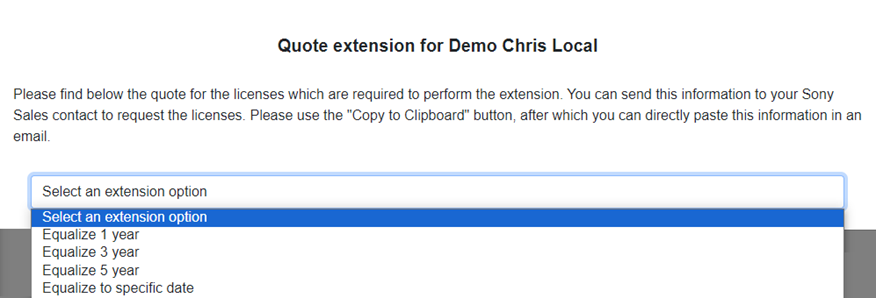
- Once you have selected your preferred option, an overview will be shown displaying the licences required for this action and the licences with their new expiration dates.
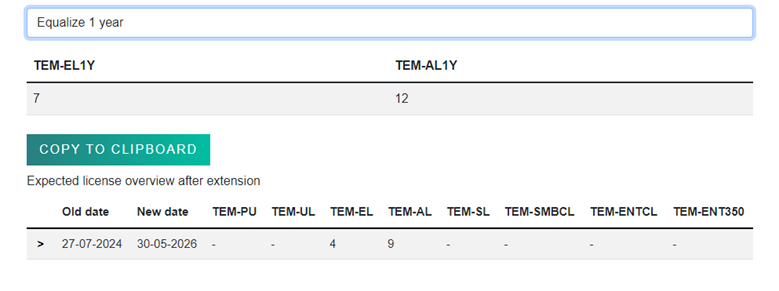
You have now successfully calculated the licences required to equalise all licences.