
Description
This guide explains how to solve the error message “This update is not compatible with your current version” when upgrading your TEOS environment to version 3.3.0. Please note that your current TEOS version must be 3.2.0. You can check this in the web interface on the “Server Management” page.
Requirements
- An active TEOS Manage installation running version 3.2.0
- Administrator rights on the web server
How to fix “This update is not compatible with your current version” error when updating to 3.3.0
- To solve this issue, check a registry value by opening regedit.exe.

- Navigate to the following registry location:
Computer\HKEY_LOCAL_MACHINE\SOFTWARE\TEOS\TEOS Manage\Settings - In this folder, there should be a registry value named “Version”.
- Double-check if the value for this registry entry matches the version mentioned on the “Server Management” page in the web interface.
- Adjust the registry value if the “Server Management” page shows version 3.2.0 but the registry value displays 3.1.0.
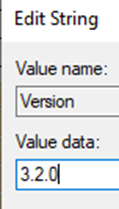
- Save the registry value. Then retry starting the TEOS 3.3.0 update installer.
If the issue has been solved, you can continue installing the TEOS update. Please contact our support department at support@teos.support if the issue persists.