
Description
TEOS Manage and IIS collect logs regarding the requests made to the web applications and the commands sent from TEOS to your devices. A new log is created every day.
This means that after a period of time, the logs could take up a significant amount of disk space. With the LogCleaner, logs older than seven days will be removed automatically.
Requirements
- Access to the TEOS Manage server with admin rights
How to install the LogCleaner
- Install “TEOS LogCleaner.exe” on the server.
Located at the bottom of the page: "TEOS LogCleaner v1.0.1.zip" - Once you have downloaded the LogCleaner, run the installer on your server. When the setup starts, a pop-up will appear. Enter your administrator account name and password, then press “OK”.
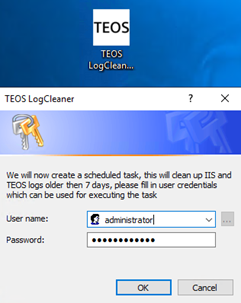
- The installer will create TEOS LogCleaner in Program Files, along with its tasks to run and logs to record what it cleaned. After this, the installer will create a scheduled task that executes the cleaner daily at 01:00 AM.

- Once the task has been executed, two log files will be generated — one for IIS and one for the backbone. These log files contain the details of the files removed from both IIS and TEOS Manage.
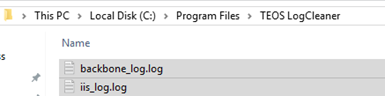
- You have now successfully installed the TEOS LogCleaner.
For further assistance, please contact TEOS support at support@teos.support